Google Search Console AI Performance Reports: How to Read Your AI Overview and AI Mode Impressions
Google's Search Console AI performance report launched June 3, 2026. Latest rollout, what it shows, what it does not, and where it fits in SEO reporting.
Google Search Console AI Performance Reports: How to Read Your AI Overview and AI Mode Impressions
Google launched the Search Generative AI performance report in Search Console on June 3, 2026. It is the first official window site owners have ever had into impressions from AI Overviews, AI Mode, and generative AI features in Discover. The data is split from the standard Search performance report and includes impressions, top pages, countries, devices, and date ranges, with hourly to monthly granularity. Click data, CTR, and query-level data are not included yet. The initial rollout went to a UK subset, and by late June 2026 Google confirmed expansion to India, the United States, and Switzerland, with the global rollout continuing through the summer.
Here is how to find the report, what the data does and does not tell you, the rollout roadmap, and how to fit it into a monthly SEO process.
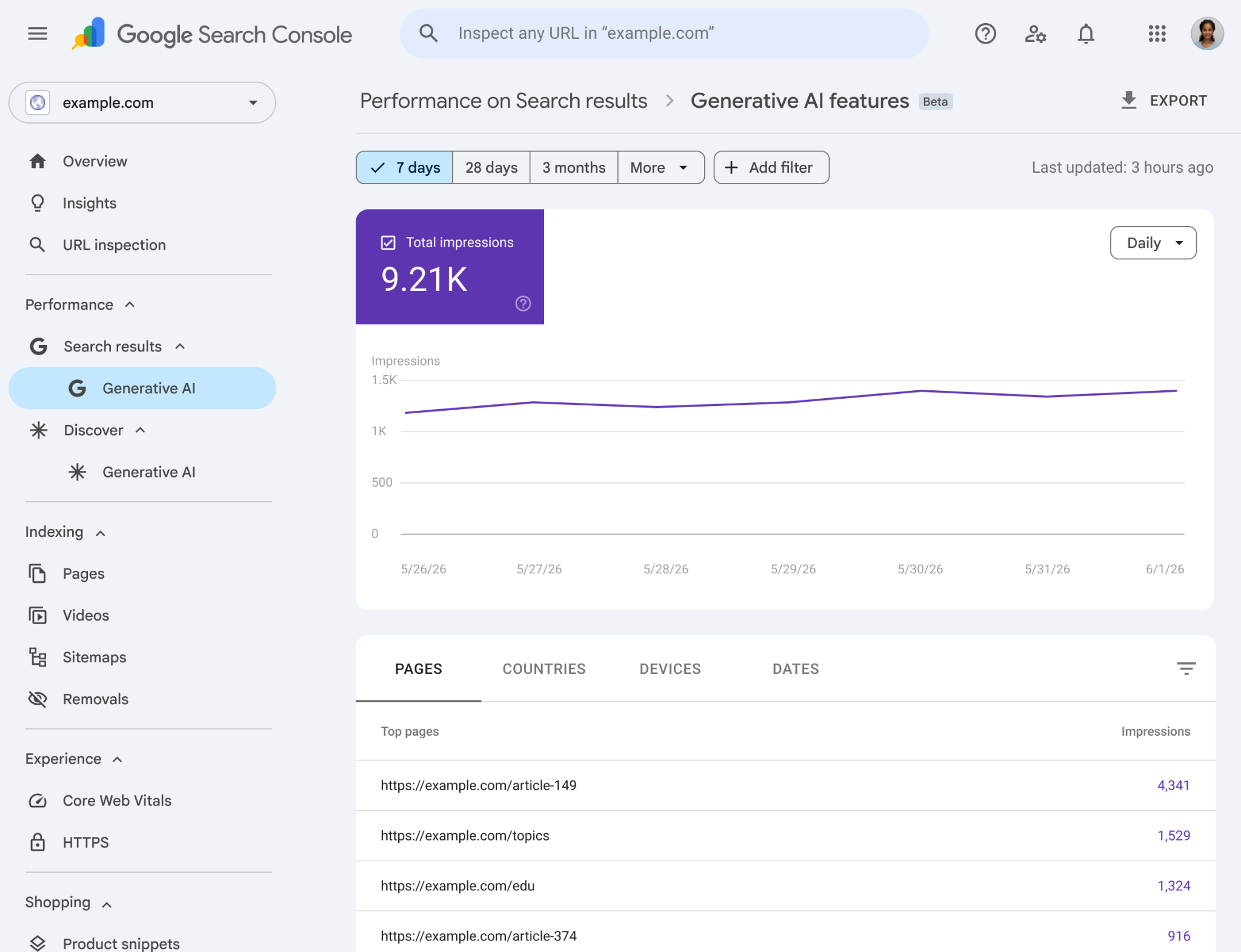
*The new generative AI features performance report inside Search Console. Image: Google.*
Where to find the Google Search Console AI performance report
The new report lives inside Search Console alongside the existing Performance reports. To open it:
1. Open Search Console and select the property you want to view.
2. In the left navigation, expand the Performance section.
3. You will see two reports: Search results (the report you already know) and Generative AI features (new in June 2026).
4. Click Generative AI features to open the AI performance report. Google also provides a direct link in its Search Console Help documentation.
If you do not see the report yet, you are likely outside the current rollout cohort. As of late June 2026, the report is available to website owners in the UK, India, the US, and Switzerland, with Google steadily expanding to additional countries over the following weeks. Google has also confirmed that some properties will not see the report at all if their site has not yet received enough impressions in generative AI features to populate it.
You can confirm what the live report looks like on Google's own Search Central blog announcement, which includes the official screenshots of the report interface, the chart view, and the page-level breakdown.
Rollout roadmap and timeline
Google has not published a fully dated rollout calendar, but it has confirmed enough waypoints to make the trajectory clear:
- Late May to early June 2026. Pre-launch tests. The report was spotted in a small number of UK Search Console accounts before the public announcement.
- June 3, 2026. Official launch. Google announced the Search Generative AI performance report on the Search Central blog with an initial rollout to a UK subset, alongside the new opt-out toggle for AI Overviews and AI Mode. The UK-first sequencing tracks Competition and Markets Authority pressure to give UK publishers visibility into AI surface impressions.
- June 17, 2026. The site-level opt-out toggle goes live.
- Mid to late June 2026. Expansion to India, the United States, and Switzerland confirmed by Search Engine Roundtable, PPC Land, and Search Engine Land. No specific country go-live dates were called out by Google; access is opening property by property.
- Through summer 2026. Continued global rollout to more website owners. Google has not named the next countries in line. Based on its standard Search Console rollout pattern, the next tranche likely includes Canada, Australia, Germany, and France. Treat that as informed speculation, not a Google commitment.
- Future (no dates committed). Google has been explicit that more data will be added over time, including (likely) click data, CTR, and query-level dimensions. Click data is the most-requested addition.
If your property does not see the report yet, the right cadence is to check Search Console every two weeks. The rollout is on Google's schedule with no notification ahead of access.
What the generative AI performance report shows
The generative AI features report mirrors the structure of the standard Search performance report, with a narrower data set. You get:
- Impressions: how many times your content appeared as a source in an AI Overview, AI Mode response, or AI feature in Discover.
- Pages: which URLs were cited, grouped by canonical URL and not by duplicates.
- Countries: geographic breakdown of where the impressions originated.
- Devices: desktop, mobile, tablet (available for Search results data).
- Dates: filterable up to 16 months, with hourly, daily, weekly, and monthly granularity, matching the standard Performance report.
You can filter by AI feature type to see whether the impressions are coming from AI Overviews or AI Mode in Search. Google's help page on the generative AI performance report lists the supported features and notes that the list will expand over time as new generative AI surfaces ship.
One detail to know about impression counting: when the same URL from your site appears in both an AI Overview and a standard blue-link result on the same Search results page, Search Console counts it as one impression, not two. Google does not double-count. This is the same aggregation pattern as the regular Performance report.
The other detail worth flagging: AI impressions were already included in your overall Performance report totals before this breakout shipped. This is a split-out view of data that already existed inside your aggregate numbers, not new data Google had been hiding. Your historical totals do not change.
What is missing
The big absence is click data. Google has not yet exposed clicks from AI features in Search Console. You can see that your page was used as a source in an AI Overview, but you cannot see whether the citation drove a click. Google has said more metrics are coming with no date confirmed. Other gaps:
- No query-level data. The Search Performance report shows which queries triggered an impression. The AI features report does not.
- No CTR. Without click data, there is no click-through rate to compute.
- No comparison view. You cannot directly compare AI impressions to traditional Search impressions side by side yet.
- No data from Search Labs experiments. Those features are still in active development and excluded.
Until Google publishes click data, treat the report as a visibility tracker, not a traffic-attribution tool.
How to fold the AI performance report into a monthly SEO report
A reasonable monthly SEO report in mid-2026 covers four data layers: traditional Search performance (clicks, impressions, position, CTR), generative AI features performance (the new report), GA4 traffic and conversion data, and rank or citation tracking across ChatGPT, Perplexity, and Gemini for branded queries.
The AI features data slots in as a visibility section. Headline questions to answer each month: how many AI impressions vs. last month, which pages are getting cited most, is there a country skew, are impressions concentrated in AI Overviews or AI Mode, and is the device split different from regular Search.
Do not overweight the AI section in client reports until click and conversion data is available. Visibility matters, but conversion still pays the bills.
The opt-out toggle (effective June 17, 2026)
Alongside the AI performance report, Google added a site-level control inside Search Console that lets site owners opt out of having their content used in AI Overviews and AI Mode, without affecting regular Search rankings. The toggle took effect June 17, 2026. Google has also confirmed the opt-out signal is not used as a ranking factor for any results outside of generative AI features.
This solves a problem publishers have been raising for two years. Until now, blocking AI use of content required blocking the crawler that powered both Search and AI, which meant losing regular Search visibility too. The new toggle separates the two.
When to consider opting out:
- Paywalled content where AI summarization would let users get the answer without subscribing.
- Premium research where the value is in the analysis, and AI summaries would let readers skip the source.
- Publishers worried about traffic cannibalization from AI summaries.
When not to opt out (covered separately, but the short version):
- Local businesses, ecommerce, services, and most lead-gen sites should leave the toggle in the default position. AI citations drive small but real traffic, and opting out means giving that up. It also removes your impression count from the new report, since opted-out sites are excluded from the data.
How to use the AI features report and the opt-out toggle together
The reasonable workflow:
1. Use the AI features report to see which pages are getting cited and how much impression volume you are getting.
2. Cross-reference with your business goals. Is the cited content monetized in a way that AI summarization undermines, or is it top-of-funnel where AI citation is a free brand impression?
3. If you have specific paywalled or premium pages that need protection, use existing page-level controls like nosnippet and max-snippet instead of the site-wide opt-out.
4. For most sites, leave the toggle in the default position and treat the AI features report as a visibility KPI.
What the AI features report does not replace
A few things this report does not do, and what you still need separately.
- Citation tracking in ChatGPT, Perplexity, Gemini. The Search Console report only covers Google's AI surfaces. To track citations in other AI assistants, you still need a separate tool or manual monitoring.
- Brand mention tracking. AI assistants often mention brands without linking. Search Console will not capture that.
- Conversion attribution from AI traffic. Without click data, you cannot see what conversions came from AI features. GA4 with custom UTM tagging on specific landing pages is a workaround for some use cases.
Frequently asked questions
When did Google launch the Search Console AI performance report?
Google announced and launched the Search Generative AI performance report on June 3, 2026, with a phased rollout starting in the UK. Late June 2026 saw expansion to India, the United States, and Switzerland, with additional countries continuing to be added through the summer.
When will the AI performance report be available globally?
Google has not committed to a global availability date. The rollout is phased by country and continuing through the summer of 2026 and likely beyond. The right cadence is to check your Search Console properties every two weeks.
How do I see AI Overview impressions in Search Console?
Open Search Console, expand the Performance section in the left navigation, and click the Generative AI features report. Impressions are broken down by date, page, device, and country. The report covers AI Overviews and AI Mode, with hourly to monthly granularity.
Does Search Console show clicks from AI Overviews?
Not yet. As of late June 2026, the AI features report shows impressions only. Click data, CTR, and query-level data are not exposed. Google has indicated more metrics are planned, but no timeline has been confirmed.
Why don't I see the AI features report in my Search Console?
Two reasons. First, the report is rolling out gradually by country, so your property may not be in the current cohort. As of late June 2026 the available regions include the UK, India, the US, and Switzerland. Second, Google does not show the report on properties that have not received enough generative AI impressions to populate it.
How is the generative AI performance report different from the regular Search performance report?
The Search performance report covers traditional blue-link search results. The generative AI features report covers impressions in AI Overviews and AI Mode. The two are split intentionally so traditional Search data is not muddied by AI surface data. When a single URL from your site shows up in both an AI Overview and a blue-link result on the same Search page, Google counts that as one impression, not two.
Can I opt out of AI Overviews using Search Console?
Yes. The opt-out toggle took effect June 17, 2026. You can disable AI Overviews and AI Mode use of your content without affecting your regular Search rankings. The setting is in Search Console alongside other site-level controls. Note that opting out removes your impressions from the new AI performance report.
Should I opt out of AI Overviews?
For most sites, no. AI citations are a small but real source of traffic and brand impressions. Opt out if you have paywalled content or premium research where AI summaries would undercut your monetization model. For local, ecom, and services sites, leaving the toggle in the default position is the right call.
Bottom line
The Google Search Console AI performance report is the first official window into AI search visibility, and as of late June 2026 it is live in the UK, India, the US, and Switzerland with continued global expansion through the summer. It is still incomplete (no clicks, no queries, no CTR yet), but it is the only authoritative source of AI impression data Google has ever published. Add it to your monthly SEO report as a visibility metric, watch for the click data update, and use the new opt-out toggle only if AI summarization actively undercuts how you make money.
*Want help setting up a monthly SEO report that covers traditional Search, AI features, and conversion data? Book a call with us.*
Related articles
- Google Reviews Are Disappearing in July 2026: What's Happening and How to Recover Legitimate Reviews
- Google's June 2026 Spam Update: What It Targets and How to Respond
- Why 80% of ChatGPT Product Recommendations Change When Web Search Is Enabled
- The May 2026 Google Core Update: What Changed and What to Do If You Got Hit
- Google Home Listing Ads Explained: How the LSA Real Estate Format Works in All 50 States
- AI Overviews Are in 25% of US Searches. Here's How to Keep Traffic When Rankings Hold But Clicks Drop.
- All Kanopy resources
- SEO & web services
- Paid ads services
- AI outreach services