How to Track Google Ads Calls From Your Google Business Profile (the Hidden Phone Number Setting)
The Google Ads phone number setting on Google Business Profile shows a call tracking number on ads, so you can separate paid calls from organic calls.
How to Track Google Ads Calls From Your Google Business Profile (the Hidden Phone Number Setting)
If you run Google Ads location assets, there is a setting called the Google Ads phone number on Google Business Profile that lets you track which calls came from your ads instead of from your organic listing. It lives in your Business Profile advanced settings, not in Google Ads, and it swaps in a call tracking number only when your profile shows as an ad. Set it, and paid calls and organic calls stop blending into one untrackable pile. Most advertisers, and plenty of Google support reps, do not know it exists. Here is what it does and how to turn it on.
The problem: paid and organic calls look identical
Location assets (you may still call them location extensions) link your Google Business Profile to a Google Ads campaign so your business can show up for local searches and drive store visits. When they run, your Business Profile appears as an ad on Google Search and Maps, and it looks almost exactly like your organic listing does. Same name, same map pin, same call button.
That last part is the catch. By default, the ad shows your primary business phone number, the same number on your organic profile. So when someone taps to call, you have no way to know whether they found you through an ad you paid for or through your free listing.
For most other Google Ads formats, this is a solved problem. Call assets and Google forwarding numbers give you a tracking number, so calls, conversions, and return on ad spend all flow into your reporting. Location asset calls have quietly been the exception. The call goes to your main line, it never gets tagged as an ad conversion, and your reporting understates what the campaign actually produced.
For a local business, phone calls are often the whole point of the campaign. If you cannot separate paid calls from organic ones, you are flying blind on the metric that matters most, and you are probably underreporting your own results.
The fix: the Google Ads phone number setting on Google Business Profile
There is a lesser-known field in Google Business Profile that solves this. It is called the Google Ads phone number, and it does one specific thing: it dynamically replaces your usual primary phone number with a call tracking number of your choice, but only when your Business Profile appears as an ad on Google Search or Maps. When your profile shows up organically, callers still see your normal primary number.
That distinction is the whole trick. You are not changing the phone number on your public listing. You are giving Google a second number to display in the paid context only. Organic visitors get your main line. Ad clicks get your tracking line. Now every call to the tracking number is, by definition, a call your ads produced.
!Google Business Profile advanced settings showing the Google Ads phone number field
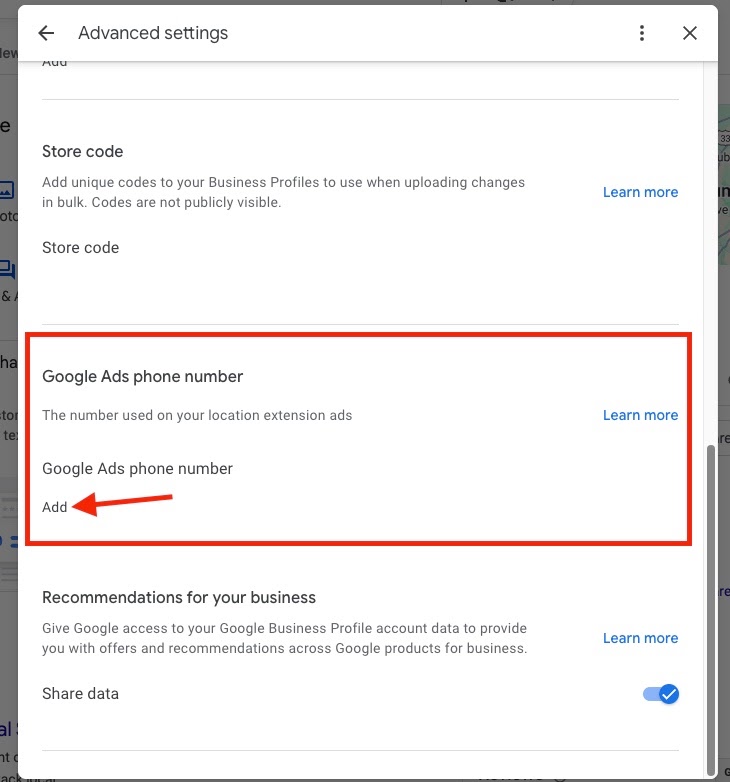
The field sits under Advanced settings in your Business Profile, right below the store code. It is easy to miss, which is a big reason so few people use it.
Why most Google reps do not know about this
This is not a knock on support staff. It is a structural blind spot. The setting lives in Google Business Profile, but the problem it solves belongs to Google Ads, and those are two different products with two different support teams. An Ads rep looking for call tracking naturally looks inside Google Ads, where this control does not exist. A Business Profile rep is not usually thinking about ad attribution.
On top of that, the feature is documented mainly through a Google Business Profile community guide rather than front-and-center in the Ads help flow, and it is buried a few clicks deep in advanced settings. The result is a genuinely useful control that almost nobody surfaces on their own. If you have ever asked a rep how to track location asset calls and gotten a shrug or a workaround, this is why.
For an agency or an in-house marketer, that obscurity is an advantage. It is a real fix that most competitors are not applying.
How to set it up, step by step
You do this from Google Business Profile while signed in as an owner or manager, not from Google Ads.
1. From Google Search, look up your own business the same way you would when you want to edit your Business Profile.
2. Click the three-dot menu on your Business Profile.
3. Click Business Profile settings.
4. Click Advanced settings.
5. Scroll down to Google Ads phone number and click Add.
6. Enter the call tracking number you use in your other Google Ads call assets, then click Save.
That is it. From then on, when your Business Profile serves as an ad in Search or Maps, callers see your tracking number. When it shows organically, they see your primary number.
One practical note: use the same forwarding or call tracking number setup you already trust for Google Ads call reporting. If your tracking is set up through a call platform, use the number from that platform so the calls land in the same reporting you already review.
How this shows up in your reporting
Once the tracking number is live on the ad version of your profile, the separation becomes clean:
- Calls to the tracking number are calls driven by your Google Ads location assets. These can be counted as conversions and tied back to campaigns, keywords, and spend.
- Calls to your primary number are organic. They came from your free Business Profile, local pack, or Maps listing.
For anyone running call-based reporting, this closes a real gap. You can finally show a client, or your own leadership, how many calls the ads produced versus how many the organic presence produced, and you can calculate a real cost per call and return on ad spend for the local campaign instead of guessing. If you route calls through a dedicated call tracking tool, the tracking number carries all the same detail you get on every other Google Ads call: timestamp, duration, and whether it counted as a qualified lead.
The knock-on benefit is trust in the numbers. When paid and organic calls are lumped together, campaigns tend to look worse than they are, because a chunk of the value is invisible. Splitting them usually makes the paid side look better, and it makes the whole report defensible.
Rules and gotchas to know
A few things to keep in mind before you set this and forget it:
- Premium-rate numbers are not allowed. Numbers that charge callers extra, like 1-900 in the US or 871 in the UK, are rejected. Your number has to follow the same call ad requirements Google Ads applies to any call asset.
- It only affects the ad. This setting does not change your organic phone number, so your name, address, and phone consistency for local SEO stays intact. That is a meaningful difference from swapping your primary number outright, which you should not do.
- Test it. After you save, run a search that triggers your ad and confirm the tracking number displays, then place a test call and check that it lands in your reporting.
- Watch for verification steps. Business Profile occasionally applies a short review or security delay to changes, so confirm the number went live rather than assuming it did.
- Keep the numbers in sync. If you change call tracking providers or numbers in Google Ads, update this field too, or your location asset calls will fall out of your reporting again.
Frequently asked questions
What is the Google Ads phone number setting on Google Business Profile?
It is a field in your Business Profile advanced settings that displays a separate call tracking number whenever your profile appears as a Google Ads location asset on Search or Maps. When your profile shows organically, it keeps displaying your primary number. It exists so you can tell paid calls apart from organic ones.
Does this change my main business phone number or hurt my local SEO?
No. The tracking number only shows when your profile is serving as an ad. Your organic listing keeps your primary number, so your name, address, and phone consistency is not affected. That is exactly why this method is safe, unlike replacing your primary number to try to track calls.
Do I set this up in Google Ads or in Google Business Profile?
Google Business Profile. This is the part that trips people up. The control does not exist inside the Google Ads interface, so you have to open your Business Profile settings, go to Advanced settings, and add the number there.
How do I know a phone call came from a Google Ads location asset?
Any call to the number you entered in the Google Ads phone number field came from the ad version of your profile, because that number only displays on the ad. Calls to your primary number came from your organic listing. Route the tracking number through your call reporting tool and those calls line up with your Google Ads campaign data.
Why do so few people, including Google reps, know about this?
The setting lives in Google Business Profile while the problem it solves belongs to Google Ads, and those are separate products with separate support teams and help docs. It is also documented mainly in a community guide and buried in advanced settings, so it rarely comes up unless someone goes looking for it.
What kind of phone number should I use?
Use the same type of call tracking or forwarding number you already use for Google Ads call assets, ideally from the call tracking platform you report from. Avoid premium-rate numbers, and make sure the number meets Google Ads call ad requirements.
Bottom line
The Google Ads phone number setting on Google Business Profile is a small field with an outsized payoff. It swaps in a tracking number only when your profile runs as an ad, which finally lets you separate paid calls from organic calls in your reporting. It is not in Google Ads, it is buried in Business Profile advanced settings, and most advertisers and support reps never find it. For local businesses that live and die by phone calls, turning it on is one of the cleanest attribution wins available.
*Want help setting up call tracking and clean reporting on your local campaigns? Book a call with us.*
Related articles
- How to Remove "Found by Google" Products From Google Merchant Center
- Ask Advisor and AI Performance Insights: What Just Launched in Google Merchant Center on June 23, 2026
- The DSA to AI Max Migration: What's Changing in September 2026 and February 2027
- The August 17 Google Ads Bidding Target Change: What Limited-by-Budget Campaigns Are About to Do Differently
- Google Will Use UK and EU IP Addresses for Ad Personalization on August 3, 2026. Here's What Advertisers Need to Do.
- Google Ads Customer Match Auto-Classification: How to Label Your Conversion Lists Before August
- All Kanopy resources
- SEO & web services
- Paid ads services
- AI outreach services