Ask Advisor and AI Performance Insights: What Just Launched in Google Merchant Center on June 23, 2026
Google added Ask Advisor and AI performance insights to Merchant Center on June 23, 2026. What each tool does, where to find them, and how to use them.
Ask Advisor and AI Performance Insights: What Just Launched in Google Merchant Center on June 23, 2026
On June 23, 2026, Google added two new tools inside Merchant Center as part of its Universal Commerce Protocol (UCP) push (we covered the Shopify side of UCP when the spec first opened up). The first is Ask Advisor, an agentic collaborator that pulls insights from across Google Ads, Merchant Center, and Google Analytics and surfaces them in plain language. The second is an AI performance insights view that shows your brand's share of voice on AI surfaces like Search AI Mode and Gemini compared to similar brands. Both are live now in U.S. Merchant Center accounts. Both are free.
This piece explains what each tool does, where to find them, who they help most, and how to use them in the next week without breaking anything in your account.
What Ask Advisor is
Ask Advisor is a conversational assistant inside Merchant Center. It can read across your linked Google Ads accounts, your Merchant Center catalog, and your linked Google Analytics property, and answer questions about performance, product issues, and opportunities.
The interface is a chat panel in the Merchant Center sidebar. You type a question in plain language. Ask Advisor returns an answer with the relevant data, a short explanation, and where useful a recommended next step inside the product. You can ask it things like:
- Which products have the highest impression share but the lowest click-through rate this month?
- What categories are underperforming compared to last quarter?
- Are any of my top-selling SKUs showing up disapproved or with low quality flags?
- Where am I losing impression share to competitors on my best-margin products?
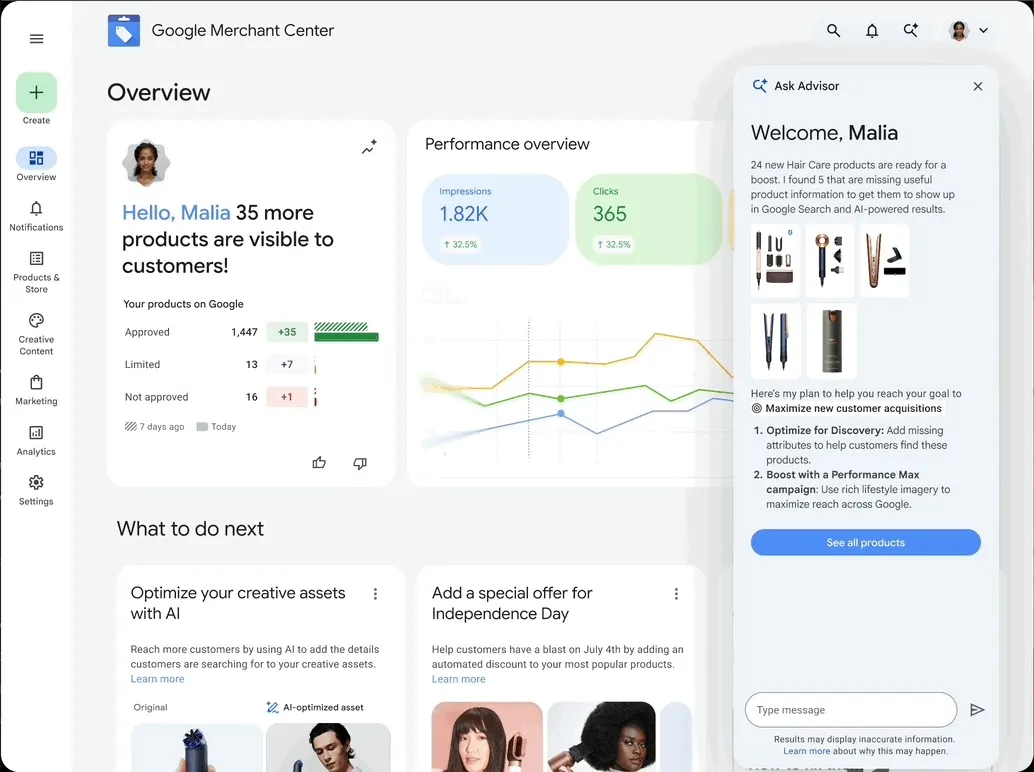
*Ask Advisor inside Merchant Center. Image: Google.*
Ask Advisor is built on the same agentic infrastructure Google has been rolling out across Ads tools in 2026. It does not change anything in your account on its own. It surfaces information and suggests actions. The merchant approves or ignores each suggestion. (Search Engine Land's breakdown of the cross-product Ask Advisor rollout is the clearest third-party explainer if you want more context.)
What AI performance insights show
AI performance insights are a separate report inside Merchant Center that focuses specifically on how your brand and your products are showing up on AI-driven surfaces. The two surfaces it currently covers are Search AI Mode and the Gemini app.
The report gives you three things:
1. Your brand's share of voice on AI surfaces, expressed as the percentage of product mentions or product card placements that go to you versus a defined competitor set.
2. A list of the queries on AI surfaces that are most frequently returning your products, including the share you hold on each.
3. Comparison against a competitor set Google builds automatically based on your product categories and your declared brand. You can adjust the competitor set inside the report.
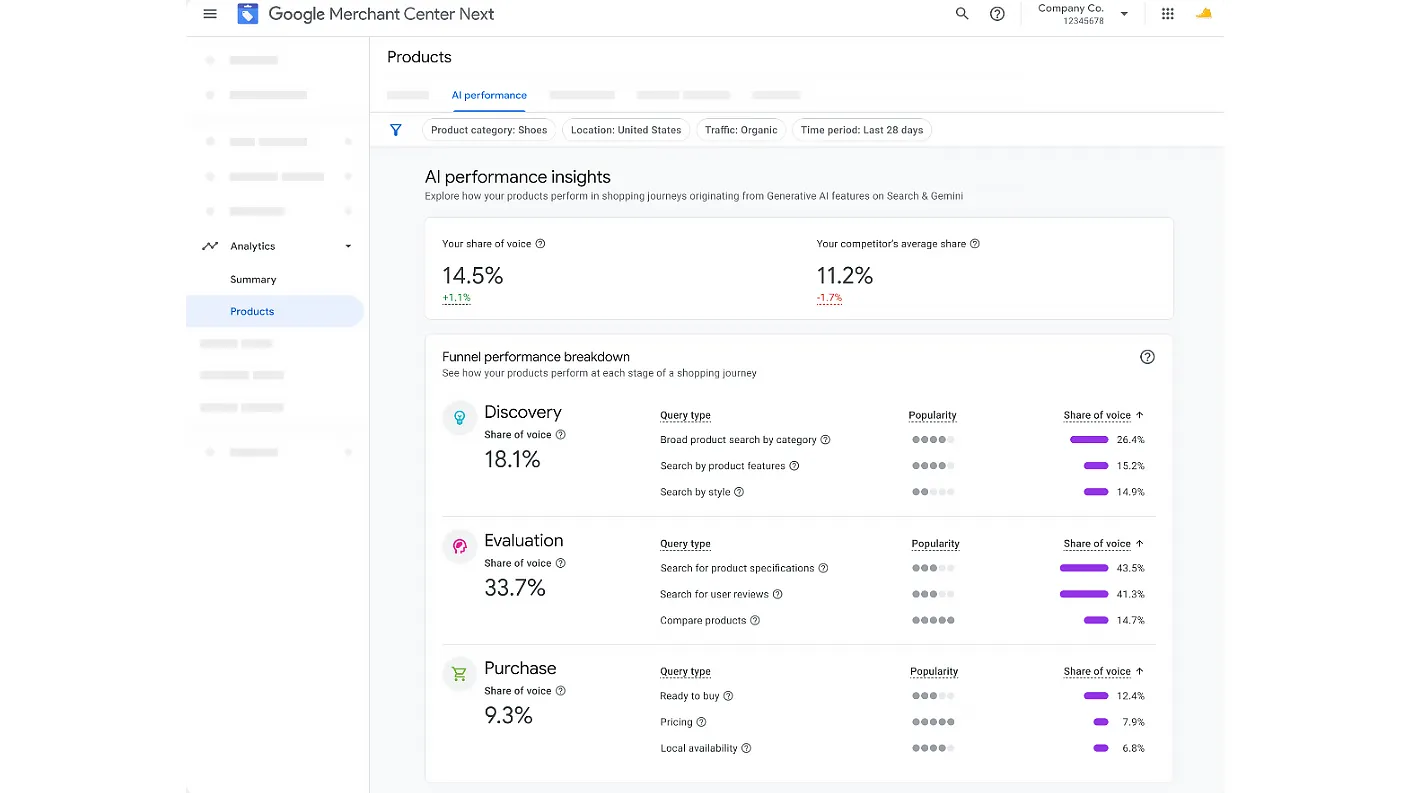
*AI performance insights in Merchant Center, share of voice and shopper journey view. Image: Google.*
!Google Merchant Center AI performance insights showing product attributes and term-level visibility
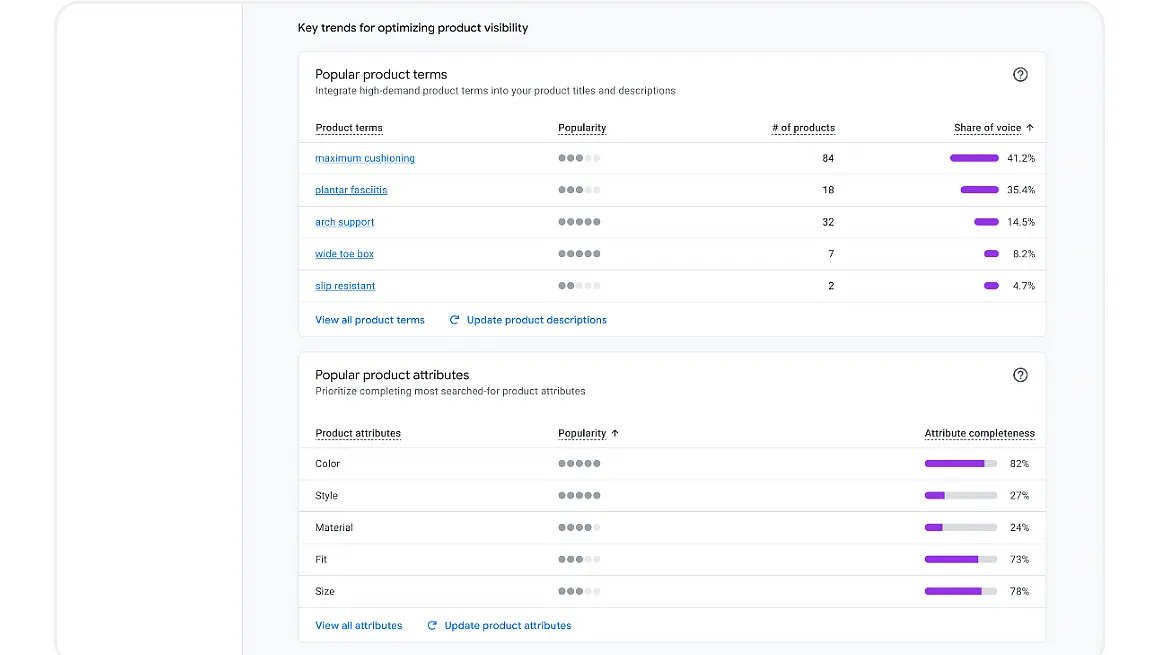
*AI performance insights, product terms and structured attributes view. Image: Google.*
This is the first time Google has given retailers a direct, native view of how their products are doing on AI surfaces. Until June 23, the only way to even guess at AI surface performance was to manually query AI Mode and Gemini, screenshot the results, and try to build a dataset by hand. The closest equivalent on the organic side is the AI performance report in Google Search Console, which we walked through when it shipped.
Why this matters
Two reasons.
First, the operational reason. If you sell physical products and you have a Merchant Center account, you now have native answers to questions that used to take a full afternoon to assemble from Ads, Analytics, and spreadsheets. Ask Advisor cuts the time to a baseline diagnostic on a Merchant Center account from hours to minutes. Anyone running multiple Merchant Center accounts (agencies, larger in-house teams, anyone managing brand portfolios) will feel this immediately.
Second, the strategic reason. AI performance insights is the first step Google has taken toward giving retailers measurable visibility into AI search. The data is partial right now (only Search AI Mode and Gemini, only product mentions and card placements, only U.S. accounts), but the direction is clear. AI surface share of voice is on its way to becoming a standard KPI alongside CTR, impression share, and conversion rate. It is the paid-side equivalent of the visibility metrics we cover in AEO vs GEO vs SEO. Brands that start tracking it now will be ahead.
Where to find both tools
Both live inside Merchant Center under the new "AI tools" section in the left navigation. If you do not see the section yet, your account is in a rolling-release pool and should get access within a week. Account managers running multiple Merchant Center accounts can request priority enablement through their Google Ads account team.
To use Ask Advisor:
1. Open Merchant Center.
2. Click "AI tools" in the left nav.
3. Click "Ask Advisor."
4. Type a question. Start broad if you are exploring (for example, "what should I focus on this week?") and refine from there.
To open AI performance insights:
1. Open Merchant Center.
2. Click "AI tools" in the left nav.
3. Click "AI performance insights."
4. The default view shows the last 28 days of AI surface share of voice for your account. Adjust the date range, the surface filter, and the competitor set as needed.
What to ask Ask Advisor in your first session
Three questions worth running in the first ten minutes on any account:
1. "Which of my products have the biggest gap between impressions and conversions in the last 30 days?" This surfaces feed quality issues, image problems, and pricing issues that often hide in the long tail of your catalog.
2. "Show me my top 10 categories by ad spend, ranked by ROAS." Useful as a sanity check on where money is going and a starting point for budget reallocation conversations (and a natural setup for testing Google Ads Promotion Mode on your strongest categories).
3. "Are any of my products showing up disapproved or limited?" A faster way to surface policy issues than the Diagnostics tab, and Ask Advisor often explains the actual root cause in plain language rather than referencing the generic policy ID.
How to read AI performance insights without overreacting
AI surface data is noisy in its first month. Google is still calibrating which mentions count, which placements count, and how to define competitor sets. Three caveats worth holding in mind:
- A low share of voice in week one does not necessarily mean your brand is invisible on AI surfaces. It might mean Google has not finished indexing your product catalog against AI prompts yet.
- Competitor set definitions can be wrong in the first few weeks. Check the competitor list before reading the share-of-voice number too literally. If the set includes brands that are not actually your competitors, the comparison is meaningless.
- Query-level data is sparser than on traditional Search. Treat individual query insights as directional, not definitive, until you have a 60-day baseline.
Use the report for trend and direction in June and July. Treat absolute numbers as a working estimate until at least August. The same logic we apply to AI Overviews traffic patterns applies here: watch the trend, not the noise.
What this means for AI search optimization
Ask Advisor and AI performance insights are signals about where Google is going. Specifically, three things are now clear:
1. Google is going to give retailers more native AI-surface visibility, not less, over the next 12 months. Bet on AI surface measurement becoming a standard part of the marketer's reporting stack by mid-2027.
2. Product feeds are the unit of measurement on AI surfaces, not pages. Treat every feed enrichment opportunity (richer titles, better images, the video_link attribute) as dual-purpose investment. If your product titles, descriptions, attributes, and images are not high quality, your AI surface performance will be low even if your traditional Shopping Ads performance is fine (the same logic applies inside Performance Max asset experiments when testing creative). Feed quality is now a dual-purpose investment.
3. Share of voice on AI surfaces is going to be queryable, comparable, and benchmarkable. Brands that wait for that data to mature before paying attention will be behind brands that build the muscle now.
How to use this in client reporting this month
If a client is already on Google Ads and Merchant Center, add two things to your June and July reports:
- A short Ask Advisor diagnostic. Three questions, three answers, three recommended actions. This shows the client you are using the newest tools and gives them visibility into what the platform itself is flagging.
- A first-pass AI performance insights screenshot. Include the share-of-voice number with a clear note that the data is new and noisy. Set up the conversation now so the trend becomes part of the standard report by Q4.
Do not promise specific outcomes from either tool yet. The data is too new to commit to. What you can promise is that your team is using the newest data Google offers and will integrate it into the reporting cadence as it stabilizes.
What this does not do
Two things to be clear about.
Ask Advisor is not autonomous. It does not change bids, pause campaigns, or edit your feed. It surfaces information and suggests actions. The action is yours.
AI performance insights does not give you raw query data the way Search Console does for organic. You get aggregated views of mentions and placements on AI surfaces. If you want individual prompt-by-prompt visibility, you still have to do that work manually.
Frequently asked questions
Is Ask Advisor available in every country?
No. The June 23, 2026 launch is U.S.-only. Google has indicated international rollout in the second half of 2026 but has not published specific country dates. The Merchant Center help center tracks regional availability as it expands.
Does Ask Advisor need new permissions?
It uses the existing Merchant Center permission scope. If you have admin or standard access to Merchant Center, you have access to Ask Advisor. Read-only users get a limited version of the tool.
Will Ask Advisor replace the Diagnostics tab in Merchant Center?
Not in the short term. Diagnostics still exists and still surfaces feed-level policy issues. Ask Advisor sits on top of Diagnostics, Ads data, and Analytics data, so it can answer questions that span all three. For now, treat them as complementary tools.
How accurate is AI performance insights?
The data is fresh and Google has been transparent that the first few weeks will involve calibration. Treat directional reads (trending up or down, your brand showing up in a specific query category) as more reliable than absolute share-of-voice numbers in June and July 2026.
Does Ask Advisor pull from third-party tools?
Not yet. It reads from linked Google products only: Google Ads, Merchant Center, Google Analytics. Third-party integrations are on the published roadmap but no firm dates.
What does "share of voice" actually mean in this report?
In AI performance insights, share of voice is the percentage of product-related mentions or product card placements on Search AI Mode and Gemini that go to your brand, measured against a defined competitor set. It is not a measure of clicks, traffic, or revenue. It is a measure of visibility.
Bottom line
Ask Advisor and AI performance insights both went live in U.S. Merchant Center accounts on June 23, 2026. Ask Advisor is a conversational tool that answers questions across Ads, Merchant Center, and Analytics. AI performance insights is the first native view of brand visibility on AI surfaces. Both are free. Both deserve ten minutes on every Merchant Center account this week. Treat the data as directional in June and July, and start folding the numbers into client reports so the trend is built into the cadence before AI surface measurement becomes a standard KPI.
*Want help integrating these new tools into your reporting and feed strategy? Book a call with us.*
Related articles
- How to Track Google Ads Calls From Your Google Business Profile (the Hidden Phone Number Setting)
- How to Remove "Found by Google" Products From Google Merchant Center
- The DSA to AI Max Migration: What's Changing in September 2026 and February 2027
- The August 17 Google Ads Bidding Target Change: What Limited-by-Budget Campaigns Are About to Do Differently
- Google Will Use UK and EU IP Addresses for Ad Personalization on August 3, 2026. Here's What Advertisers Need to Do.
- Google Ads Customer Match Auto-Classification: How to Label Your Conversion Lists Before August
- All Kanopy resources
- SEO & web services
- Paid ads services
- AI outreach services